TL;DR
In 2026, buying a prebuilt AI workstation often costs less upfront and saves time, thanks to component shortages and bulk buying. Building gives you control but can be more expensive and time-consuming. Your choice hinges on your budget, expertise, and how quickly you need the machine.
Imagine plugging in a machine and diving straight into AI training or inference. No fuss, no guesswork. That’s the promise of a prebuilt AI workstation in 2026. But for the hobbyist, researcher, or enterprise, the decision to build or buy is more complex than ever.
Prices are shifting, supply chains are strained, and the skills needed to build a high-powered AI rig aren’t trivial. You’ll want to weigh speed, cost, control, and future-proofing. This guide cuts through the noise, showing you exactly what each path offers.
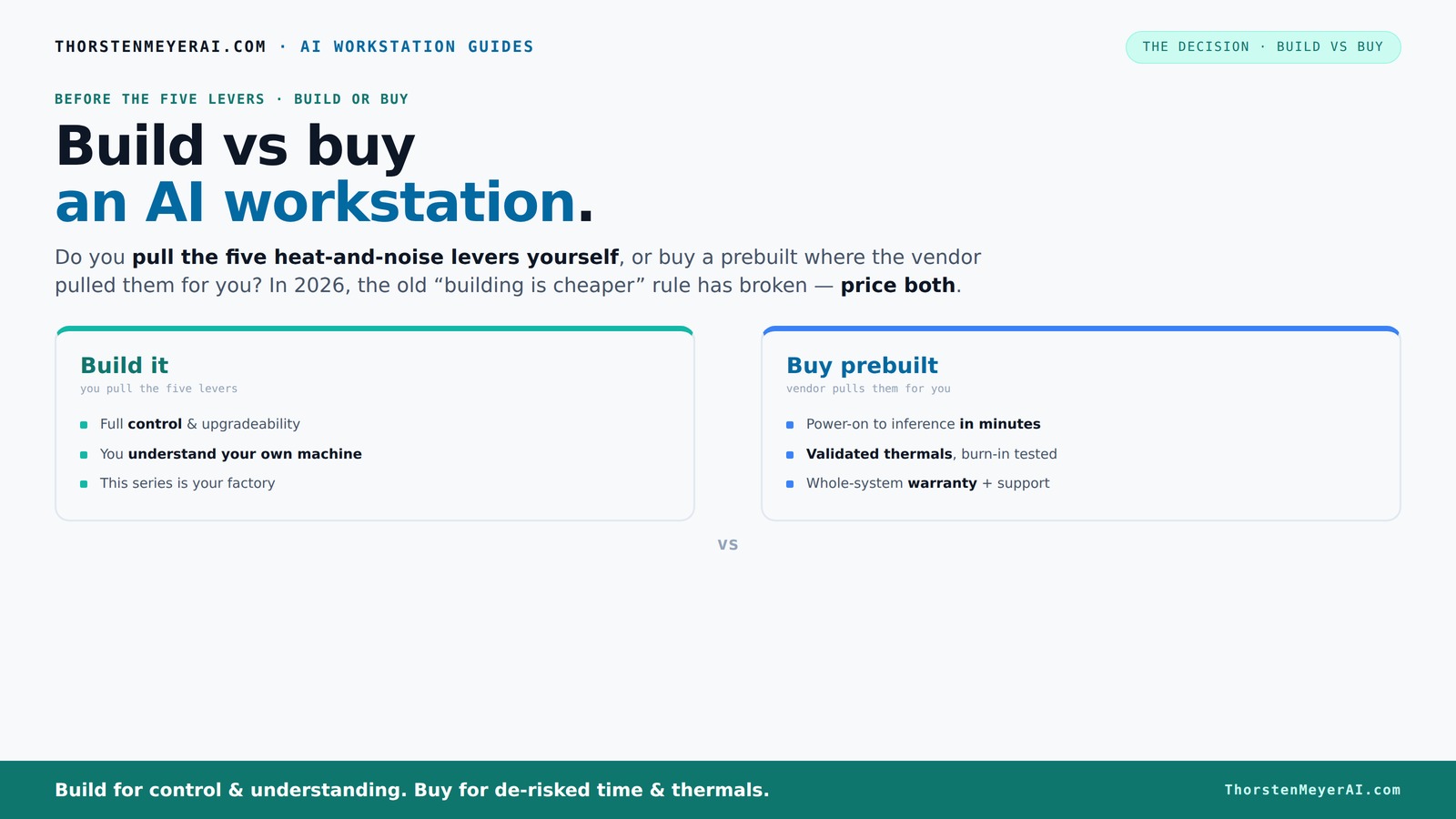
Build vs buy
an AI workstation.
The real question behind this whole series: do you pull the five heat-and-noise levers yourself, or buy a prebuilt where the vendor pulled them for you? And in 2026, the old “building is cheaper” rule has broken. Match your situation in Part 3.
Key Takeaways
- Component shortages in 2026 make prebuilt AI workstations often cheaper than DIY builds for comparable specs.
- Buying a prebuilt saves time, reduces risk, and offers validated thermal performance—ideal for enterprise or time-sensitive projects.
- Building your own system gives you maximum control over cooling, noise, and upgradeability, perfect for custom workflows or proprietary projects.
- Total cost of ownership depends heavily on support, maintenance, and future upgrades—not just initial price.
- Hybrid setups offer a middle ground, combining quick deployment with tailored tweaks for performance and noise.
As an affiliate, we earn on qualifying purchases.
What Exactly Is a Prebuilt AI Workstation Today?
A prebuilt AI workstation is a ready-to-run hardware system designed for heavy-duty AI workloads. It’s assembled, tested, and optimized by a vendor. Think of it as buying a car that’s already tuned for speed and comfort—no need to assemble it yourself.
For example, Dell's AI PCs come with GPUs, cooling, and software configured for inference tasks right out of the box. They include professional-grade cooling, validated thermal performance, and warranties that cover potential failures. It’s hardware and software, integrated and validated, saving you weeks of setup.
Build vs Buy: What’s Actually Included?
Building an AI workstation involves sourcing each component—GPU, CPU, RAM, cooling, case—and assembling everything yourself. This process requires a good understanding of hardware compatibility, thermal dynamics, and power delivery. You’ll need to optimize for airflow, reduce noise, and troubleshoot issues that arise during assembly or operation. The tradeoff here is complete control over every aspect of the system, which can lead to a highly tailored machine that perfectly fits your workload and environment. However, this requires time, technical skill, and patience, especially when dealing with complex cooling setups or potential component incompatibilities.
Buying a prebuilt shifts these responsibilities to the vendor. They handle component selection based on tested configurations, ensuring thermal validation, stability, and compatibility. Prebuilts often come with pre-installed software stacks like CUDA, TensorFlow, or Docker, enabling rapid deployment. This convenience comes at a premium, but it significantly reduces setup time and technical barriers. For many users, especially those with tight deadlines or limited hardware knowledge, this turnkey approach minimizes frustration and risk, delivering a system that’s ready to perform from day one.
Cost Showdown: Upfront Price vs Total Cost of Ownership
| Build | Buy |
|---|---|
| High initial costs due to component prices, labor, and setup time. For example, a DIY rig might cost $2,000–$2,500 in parts today. These costs can be justified if you already own some components or plan incremental upgrades, but the upfront investment is substantial. Additionally, if you lack experience, you might spend more time troubleshooting or replacing parts, which adds hidden costs. | Often similar or even cheaper upfront thanks to bulk buying and vendor discounts. Prebuilt systems may start around $2,300–$2,800, with some high-end configs costing more depending on GPU choices. Over time, the total cost of ownership can be lower because prebuilt systems typically include warranties, support, and validated thermal performance, reducing unexpected repair costs and downtime. These factors are crucial for enterprise users or critical workloads where reliability and support justify the premium. |
| Long-term costs include maintenance, upgrades, and troubleshooting, which can be significant if you build yourself and encounter hardware failures or thermal issues. Conversely, prebuilt systems often have predictable support contracts and warranties that cover these expenses, providing peace of mind and stability. | Recent shortages have pushed component prices higher, making DIY cost advantages less clear. It’s essential to compare specific configurations and consider not just initial expenditure but also the potential costs of troubleshooting, downtime, and future upgrades, which can tip the balance either way depending on your expertise and needs. |
Recent market shifts mean that the traditional DIY cost advantage is less guaranteed. Carefully evaluate your specific workload requirements, support needs, and upgrade plans to determine which approach delivers the best total value.
Performance and Future Upgrades: What Matters Most?
Performance hinges on GPU power, VRAM, CPU, and cooling efficiency. A high-end GPU like an NVIDIA A100 or RTX 4090 with ample VRAM (at least 24GB) can significantly accelerate training large models or processing extensive datasets. The CPU’s role is also critical during data preprocessing, where multi-core performance impacts throughput. Cooling solutions influence sustained performance; inadequate cooling can lead to thermal throttling, reducing effective performance during long training sessions. To learn more about cooling options, visit Build vs Buy a Prebuilt AI Workstation.
Building your own system allows you to tailor cooling solutions—air, liquid, or hybrid—to match your noise and thermal preferences. It also provides upgrade paths; for example, selecting a case and power supply that support additional GPUs or higher wattage components enables future scaling. The tradeoff is complexity: more expansion options mean more planning and potential compatibility issues, but they offer flexibility for evolving workloads.
Prebuilts often come with fixed configurations optimized for current workloads. They include validated thermal solutions designed to handle sustained loads, which can be a critical advantage if you’re running long training jobs or inference at scale. While upgrade paths may be limited, they offer peace of mind that performance will remain stable without unexpected thermal throttling or hardware failures, especially important in enterprise or production environments.
Why Customization Matters (or Doesn’t)
If your AI project is a core part of your business or research, customization can be vital. You can fine-tune cooling, noise levels, and component choices to fit your exact needs, which can lead to more efficient workflows and better hardware longevity. For more insights on building or customizing your AI workstation, check out Build vs Buy a Prebuilt AI Workstation.mfortable and stable environment. Custom systems also allow for selecting components that match specific power and thermal budgets, potentially saving energy and operational costs.
However, this level of control comes with tradeoffs. Building a custom system requires time, research, and technical skill. If misconfigured, it can lead to thermal throttling, hardware instability, or increased noise. On the other hand, prebuilt systems, while less customizable, often come with validated configurations that balance performance and noise, reducing risk and setup time. They are ideal for users who prioritize reliability and quick deployment over fine-tuning every detail.
Security, Compliance, and Data Control — What Matters?
Buying a prebuilt system often means relying on vendor security protocols, firmware updates, and compliance standards. This can include hardware-level security features, secure supply chains, and adherence to industry standards, which collectively reduce the risk of vulnerabilities or data breaches. For enterprises, this means less burden on internal security teams and a higher confidence level in the system’s integrity.
Building your own system gives you deep control over hardware and software security measures. You can select components with hardware encryption support, audit firmware versions, and implement custom security policies. This is especially important for sensitive data or regulated industries where compliance and data sovereignty are critical. However, it requires ongoing effort to stay updated with firmware patches and security best practices. The choice often hinges on organizational risk appetite: larger entities tend to favor vendor-managed security for consistency and compliance, while smaller or specialized teams may prefer full control for custom security policies.
Support, Warranty, and Maintenance: Which Is Safer?
Prebuilt vendors typically include support services, such as remote troubleshooting, on-site repairs, and comprehensive warranties—sometimes extending up to three years. For example, Lambda offers up to 3 years of on-site support, burn-in testing, and rapid replacement services. This reduces downtime and ensures that hardware issues are addressed promptly, which is critical in production environments or mission-critical workloads.
DIY builds place the responsibility on you. Troubleshooting hardware failures, thermal issues, or driver conflicts can be time-consuming and stressful, especially if you lack experience. While some enthusiasts enjoy this aspect, it can lead to extended downtimes or costly repairs if issues arise unexpectedly. Support contracts and warranties can mitigate this risk, but they come at an additional expense. For businesses, reliable support and warranty coverage are often essential to maintain operational continuity and minimize financial risks associated with hardware failures.
Who Should Build? Who Should Buy?
Build if you’re a hobbyist, researcher, or startup with time, skills, and a tight budget. You enjoy tinkering and want full control over every hardware detail. Building also makes sense if your AI workload is highly specialized or proprietary, requiring custom hardware configurations that prebuilt systems cannot provide. It allows you to optimize for specific performance characteristics, noise levels, or form factors that align with your unique environment.
Buy if you prioritize speed, reliability, and minimal hassle. For enterprises or mission-critical projects, a prebuilt system offers validated configurations, professional support, and warranties that reduce risk and downtime. It’s ideal when time-to-deployment and operational stability outweigh the cost savings of DIY.
In 2026, the decision is less about initial cost and more about strategic priorities, expertise, and how quickly you need your system operational. Consider your long-term goals, available resources, and the importance of reliability when choosing your path.
Hybrid Strategies: Mix and Match for Best Results
More organizations are opting for hybrid strategies—buy a validated prebuilt base system and customize certain components like RAM, storage, or cooling. This approach balances the benefits of quick deployment and reliable performance with the flexibility to tailor the system to specific needs. For example, purchasing a preconfigured workstation and then swapping out fans or adding aftermarket cooling solutions can improve thermal performance and noise levels without the complexity of a full custom build.
This method reduces the risks associated with building from scratch while allowing you to implement targeted upgrades that enhance system stability and efficiency. It’s especially useful when budget constraints or time limitations prevent a full custom build but you still require some level of control over hardware performance and noise characteristics.
By combining validated systems with selective upgrades, you can create a tailored solution that meets your workload demands while maintaining a manageable complexity level.
Common Mistakes to Avoid When Deciding
One common mistake is assuming DIY is always cheaper—market shortages, increased component costs, and the time investment required mean that building your own system may no longer be the most economical choice. Always compare actual prices for your specific configuration, including labor and support costs.
Another mistake is overlooking future upgrade potential. Choosing a system with limited expansion options can hinder your ability to scale or adapt to new workloads, leading to costly replacements sooner than expected. Consider the motherboard, power supply, and case compatibility for future components.
Lastly, neglecting the importance of support and warranty can be costly. Skipping comprehensive support plans or warranty coverage might save money upfront but can lead to significant downtime or expenses during hardware failures, especially in mission-critical environments. Always weigh these factors carefully to avoid surprises that could derail your project or increase total costs over time.
Frequently Asked Questions
Is a prebuilt AI workstation good enough for training models, or only inference and development?
Prebuilt workstations are often optimized for inference and development, but high-end models like those from Lambda or Puget can handle training workloads too. Always check the GPU specs—more VRAM and CUDA cores matter for training.When does building become cheaper than buying?
Building becomes cost-effective if you already own some components or want to upgrade gradually. However, recent shortages have pushed component prices higher, so always compare exact prices for your desired specs.How much more does a custom workstation cost once you include labor, support, and maintenance?
Labor and support can add 20–30% to the initial hardware cost. Plus, ongoing maintenance and upgrades can sum up over time, making DIY more expensive if you need high uptime or enterprise-grade reliability.What specs matter most for AI workloads: GPU, VRAM, CPU, RAM, cooling, or power supply?
GPU and VRAM are king—look for at least 24GB VRAM for large models. CPU matters for data prep, while cooling and power supply ensure stability under load. Prioritize balanced, high-quality components.Can a prebuilt workstation be upgraded later?
Yes, but it varies. Some models support expansion—additional RAM, second GPU, or better cooling—while others are more fixed. Check the vendor’s upgrade policy before buying.Conclusion
In 2026, the choice between build and buy isn’t just about saving money—it's about aligning your workload, timeline, and control needs. A prebuilt system can be a game-changer for rapid deployment and reliability, while building offers unmatched customization for those who want to tailor every detail.
Picture your ideal AI workspace—fast, quiet, and exactly how you want it. Now ask yourself: which path gets you there faster and safer? That’s the real question.